Meetup Overhauls Communication Suite: Streamlining Tools and Enhancing User Experience for Organizers and Members

By the Meetup Product and Community News Desk
Published: July 2024 | Last Modified: September 19, 2024
Introduction and Main Facts
Effective communication is the lifeblood of any thriving community. For platforms dedicated to bringing people together in the physical and digital worlds, the tools that facilitate dialogue must be clear, consistent, and intuitive. Recognizing this fundamental truth, Meetup—the prominent global platform connecting local communities—has rolled out a comprehensive overhaul of its communication infrastructure.
Implemented officially on July 18, 2024, this sweeping update is designed to eliminate redundancy, reduce user confusion, and deliver high-demand features requested by organizers and members alike. Historically, Meetup’s ecosystem featured a fragmented array of messaging options: Group Discussions, Event Comments, Event Chat, Message Boards, Direct Messages, Event Announcements, and Contact Members mass emails. While conceived to solve various communication challenges, many of these channels overlapped significantly in functionality, resulting in a cluttered user experience and fragmented conversations.
To solve this, Meetup has taken a decisive step: streamlining the platform’s core communication suite down to the most effective, highly favored tools. Alongside this consolidation, the platform has deployed major enhancements—including markdown formatting support, comment pinning, and a total revamp of its notification reliability—to ensure that community leaders and attendees can connect more smoothly than ever before.
Chronology of the Update: How Meetup Streamlined Its Ecosystem
The path to the July 18, 2024, communication overhaul was paved by months of intensive data analysis, user feedback collection, and strategic planning by the Meetup product development team.
Phase 1: Identifying the Overlap
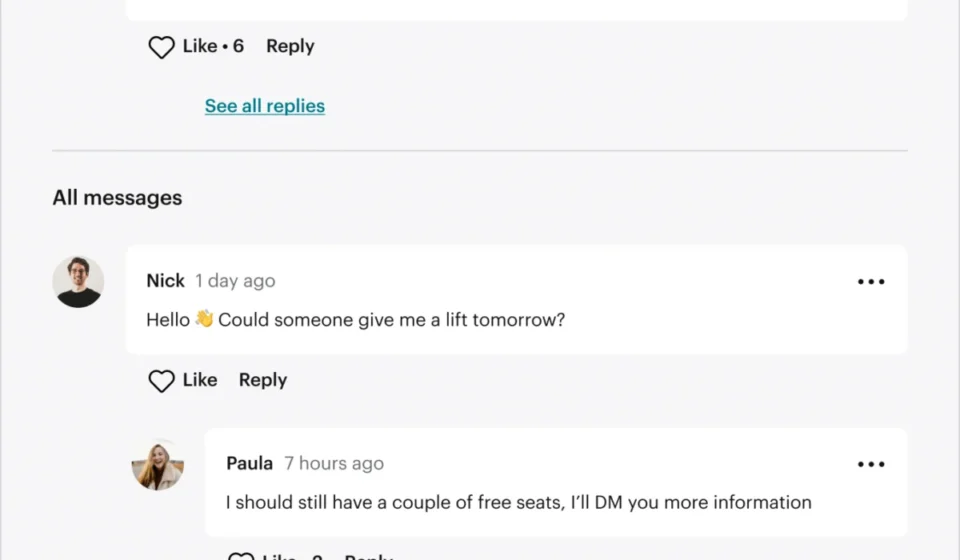
For years, community organizers and regular platform users voiced frustrations regarding the sheer number of places conversations could take place. Specifically, features like Event Chat and Event Comments served nearly identical purposes. Members frequently used them interchangeably, leading to split threads where event-specific logistics, excitement, and questions were scattered across multiple digital spaces. A parallel issue plagued Group Discussions and Message Boards, which offered overlapping long-form community posting capabilities.

Phase 2: Organizer Feedback and Data-Driven Decisions
Ahead of the update, Meetup distributed surveys and conducted direct interviews with group organizers to understand which tools were genuinely driving community engagement and which were simply adding noise.
The results of this research were decisive. Organizers overwhelmingly favored Group Discussions and Event Comments, praising them for their straightforwardness, clarity, and ease of use. Platform usage statistics corroborated these sentiments, showing that members naturally gravitated toward these two features for ongoing community dialogues and event-specific engagement, respectively. Consequently, Meetup made the strategic decision to sunset the redundant Message Boards and Event Chat features, unifying community communication into a streamlined, predictable framework.
Phase 3: The July 18, 2024 Launch
On July 18, the feature consolidation went live globally. Alongside the removal of legacy tools, Meetup deployed the first wave of highly requested performance upgrades to Group Discussions and Event Comments.
Phase 4: Ongoing Refinement and Stability (Through September 2024)
Following the initial launch, engineering teams focused heavily on backend stabilization and notification reliability. Through continuous code improvements and bug tracking, Meetup finalized a series of performance updates, culminating in a fully optimized communication suite by September 19, 2024.
Supporting Data and Technical Enhancements
The recent updates are not merely cosmetic; they represent a fundamental restructuring of how messages are formatted, prioritized, and delivered across the Meetup ecosystem. Based on direct organizer requests, the product team focused on three core technical upgrades for Group Discussions and Event Comments.
1. Markdown-Supported Formatting
Previously, text communication within comments and discussions was limited to plain text, making it difficult to emphasize key points, organize structured thoughts, or share clean hyperlinks. With the latest update, Meetup has integrated native markdown support.
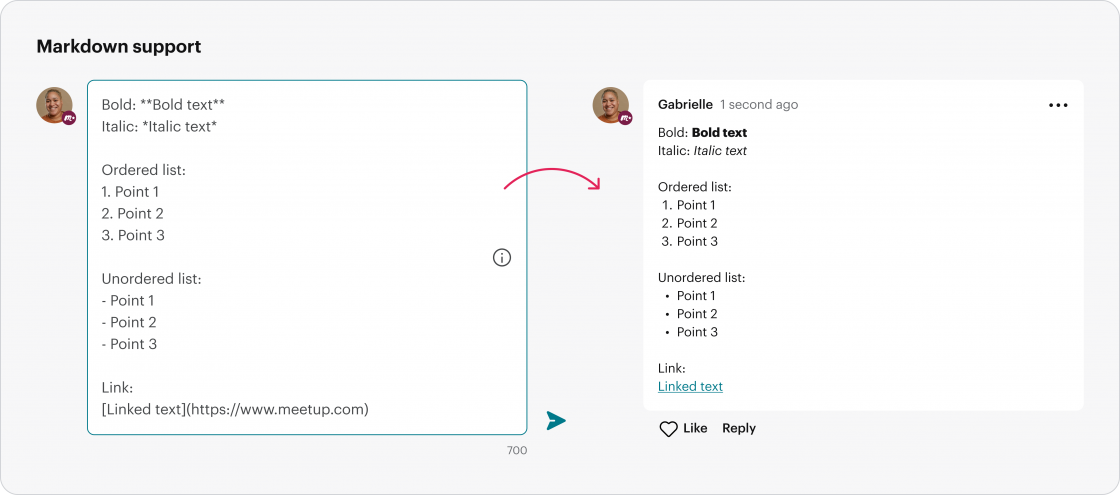
Users can now easily apply:
- Bold text for emphasis
- Italic text for tone and styling
- Ordered lists for sequential steps
- Unordered lists for bulleted points
- Clean hyperlinks to external resources or relevant event pages
This addition allows organizers to craft polished, highly readable announcements, ensuring that critical details—such as venue changes, ticket links, or preparation checklists—stand out instantly to members.
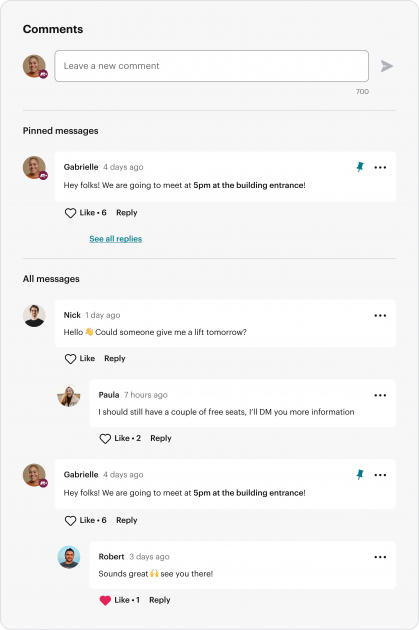
2. Pinned Event Comments
In fast-moving event comment threads, important notices regarding parking, schedule shifts, or late-breaking updates could easily get buried under a flood of casual chatter. To solve this, Meetup introduced a comment-pinning feature.
- Capabilities: Organizers and co-organizers can now pin up to three critical messages to the very top of an event’s Comments section.
- User Experience: Pinned messages are the first thing members see when opening the event discussion thread.
- Ease of Use: Pinning and unpinning messages requires nothing more than selecting a dedicated icon next to the desired comment.
3. Comprehensive Notification Overhaul
Perhaps the most critical technical fix in this update addresses an ongoing pain point for the Meetup community: inconsistent notification delivery.
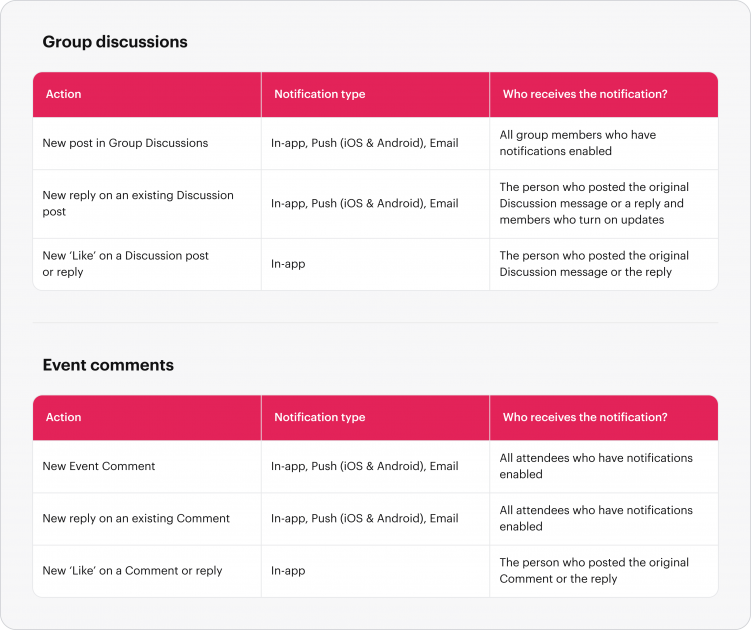
In the past, users frequently reported missing vital replies, new discussion posts, or reaction alerts due to intermittent notification failures. In response, Meetup’s engineering division undertook a comprehensive audit of every notification trigger associated with Group Discussions and Event Comments.
Every single notification pathway—covering new messages, direct replies, and user reactions—was systematically tested, diagnosed, and repaired. Furthermore, foundational improvements were made to the underlying codebase powering these features, resulting in faster load times, superior data synchronization, and absolute reliability in alert delivery across both web and mobile applications.
Official Responses and Stakeholder Perspectives
The overhaul has been met with significant interest from both community leaders and the internal leadership at Meetup.
In statements released alongside the feature rollout, the Meetup product and engineering teams emphasized that user-centric design guided every phase of the project. "Clear, consistent, and intuitive communications are key to a successful Meetup community," noted the Meetup Team in their official product release announcement. "We recognize that inconsistent notifications have been an ongoing source of frustration… By listening closely to our organizers and analyzing platform usage, we have built a foundation that makes connecting easier and more enjoyable."
Organizer feedback gathered during the beta and post-launch phases highlights a broad appreciation for simplicity. While any platform transition requires a brief adjustment period—particularly for groups accustomed to legacy features like Message Boards—the general consensus among active community leaders is that fewer, better-maintained tools are vastly superior to a bloated suite of overlapping options.
Meetup has also maintained an open feedback loop, encouraging organizers and members to submit ongoing critiques and feature requests directly through their customer support portal to guide future development phases.
Implications for Organizers, Members, and the Platform
The successful rollout of Meetup’s streamlined communication suite carries several profound implications for the platform’s future and its global user base.
For Organizers: Reduced Administrative Fatigue
Running an active Meetup group requires immense time and organizational effort. By removing redundant features like Message Boards and Event Chat, organizers no longer have to monitor multiple parallel conversations or wonder where members are choosing to interact. The introduction of markdown formatting and comment pinning gives leaders professional-grade tools to manage expectations, highlight critical logistics, and keep event discussions focused and productive.
For Members: A Clutter-Free Experience
For casual attendees and dedicated community members alike, navigating event pages and group boards is now vastly more straightforward. Conversations are concentrated in logical hubs—discussions for broad group topics and event comments for specific gatherings. Coupled with reliable notifications, members can engage with their communities confidently, knowing they will not miss updates, changes, or responses from fellow attendees.
For the Platform: Scalability and Modernization
By pruning legacy codebases and focusing development resources on high-impact features, Meetup is positioning itself for long-term technical stability. A unified communication model reduces server bloat, simplifies customer support troubleshooting, and creates a scalable foundation for future platform innovations.
As Meetup continues to refine its digital infrastructure, these communication improvements underscore the company’s commitment to bridging the gap between online coordination and real-world human connection.
Related posts: