Streamlining Community Engagement: Meetup Overhauls Its Communication Suite to Empower Organizers and Members

By the Tech & Community Reporting Desk
Published July 20, 2024 (Last Modified September 19, 2024)
Main Facts
In a decisive move to curb digital clutter and enhance user experience, the global community-building platform Meetup has officially rolled out a comprehensive overhaul of its communication ecosystem. Effective July 18, 2024, the platform has streamlined its historical suite of messaging features—sunsetting redundant tools like Message Boards and Event Chat while heavily investing in user-voted favorites: Group Discussions and Event Comments.
Driven by direct feedback from community organizers and platform data, the restructuring addresses long-standing redundancies where multiple tools served identical purposes. Alongside this consolidation, Meetup has introduced three major functional enhancements to the surviving tools: full markdown text formatting, the ability to pin essential event comments, and a complete overhaul of backend notification reliability. These changes aim to make communication clearer, more consistent, and structurally intuitive for millions of active community members worldwide.
Chronology of the Update
The path to Meetup’s July 2024 communication overhaul was years in the making, born from persistent user feedback regarding platform complexity.

- The Fragmentation Era (Pre-2024): Historically, Meetup provided a fragmented web of outreach methods. Users and organizers navigated Group Discussions, Event Comments, Event Chat, Message Boards, Direct Messages, Event Announcements, and Contact Members (mass email). Over time, users frequently noted that features like Event Chat and Event Comments functioned identically, leading to fragmented event-specific conversations. Similarly, Group Discussions and Message Boards created overlapping content silos.
- The Organizer Consultation Phase (Early 2024): Recognizing the friction caused by overlapping tools, Meetup’s product and engineering teams initiated a platform-wide survey. They directly asked community organizers which features were essential to daily operations and which were redundant. The quantitative usage data matched qualitative responses: Group Discussions and Event Comments emerged as the overwhelmingly favored tools due to their straightforward, user-friendly nature.
- The Rollout (July 18, 2024): Meetup officially sunsetted Message Boards and Event Chat. Simultaneously, they deployed a suite of long-requested improvements to Group Discussions and Event Comments, including markdown support, comment pinning, and a thorough backend code refactoring to fix notification bugs.
- Post-Launch Refinement (September 19, 2024): Following initial user adoption and ongoing telemetry tracking, Meetup finalized its documentation updates, ensuring that community support portals accurately reflected the new landscape of platform communications.
Supporting Data & Functional Breakdown
To understand the scope of the July 2024 update, one must examine how Meetup reduced its surface area while increasing depth in key features. The platform went from maintaining multiple competing channels for real-time and asynchronous messaging down to two optimized pillars:
1. The Consolidation: What Stayed and What Went
- Retained:
- Group Discussions: Maintained as the primary long-form, asynchronous hub for community-wide announcements and ongoing conversational threads.
- Event Comments: Maintained as the go-to utility for logistics, questions, and excitement surrounding specific upcoming gatherings.
- Sunken / Deprecated:
- Event Chat: Retired due to its direct functional overlap with Event Comments.
- Message Boards: Retired because Group Discussions fulfilled the exact same community engagement needs with higher usability.
2. Feature Enhancement: Markdown Support
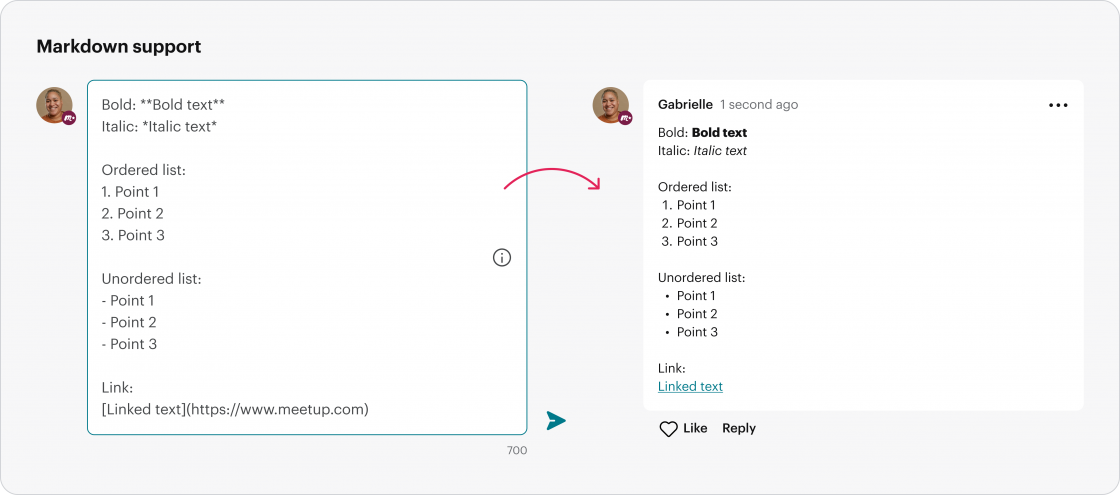
Historically, plain-text limitations frustrated organizers trying to design structured, readable posts. The new update integrates native markdown support. Organizers and members can now utilize:
- Bold and Italic styling for emphasis.
- Ordered and unordered lists for step-by-step instructions or agendas.
- Hyperlinks embedded cleanly within text bodies, drastically improving the visual clarity of lengthy community updates.
3. Feature Enhancement: Pinned Comments
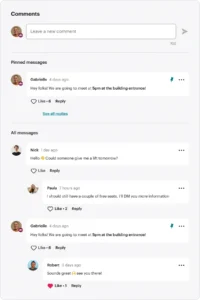
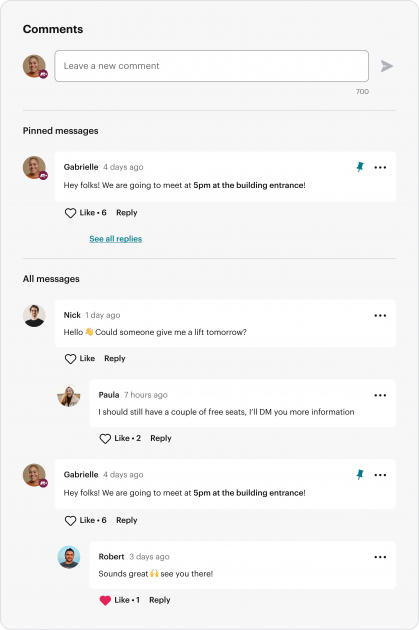
One of the most frequent requests from large-scale event organizers was the ability to highlight critical logistical details—such as parking instructions, venue changes, or arrival times—so they wouldn’t get lost in a rapidly growing comment thread.
- Under the new framework, organizers and co-organizers can pin up to three distinct messages to the absolute top of an event’s Comments section.
- Members see these pinned alerts immediately upon opening the event page. Organizers can pin or unpin notices effortlessly by toggling the dedicated icon adjacent to any message.
4. Technical Overhaul: Notification Reliability
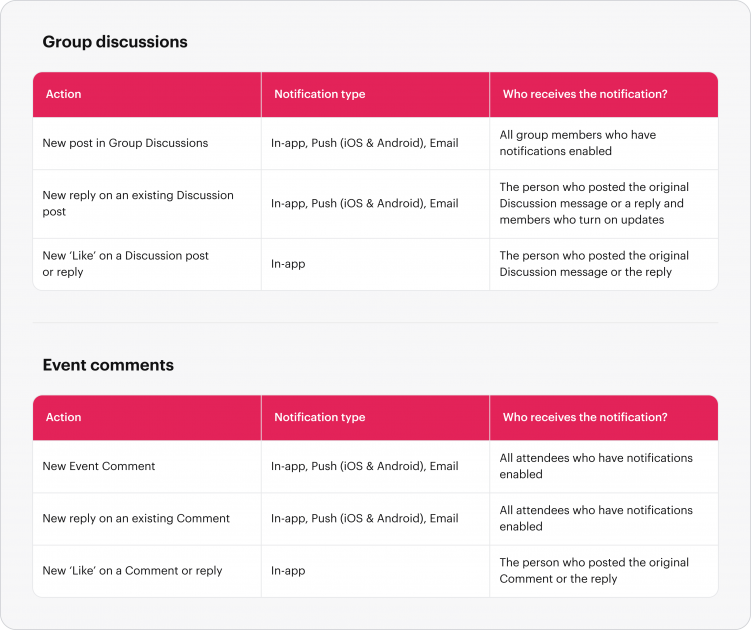
Perhaps the most critical—though less visually flashy—aspect of the update is the comprehensive audit and remediation of Meetup’s notification architecture.
- The Problem: Inconsistent notifications regarding new messages, replies, and reactions had long served as a primary source of friction and frustration for community leaders. Organizers relied on members seeing updates, but dropped packets or silent backend failures meant critical info often went unseen.
- The Solution: Over several months leading up to July, Meetup engineers systematically audited every notification trigger linked to Group Discussions and Event Comments. Bugs were patched, and global improvements were injected into the underlying code base to guarantee that push notifications and emails are delivered in a timely, predictable manner.
Official Responses & Platform Philosophy
Meetup’s leadership team has framed the overhaul not as a reduction of capabilities, but as a deliberate refinement designed to honor the core tenets of community management: clarity, consistency, and intuition.
In official statements accompanying the rollout, product representatives emphasized that clear communication is the bedrock of any thriving Meetup community. By stripping away redundant pathways that historically confused newcomers and stretched organizers thin, the platform has lowered the barrier to entry for digital leadership.
"Clear, consistent, and intuitive communications are key to a successful Meetup community," the Meetup Team stated in their official product release. "As we looked at our historical tools, we saw significant overlap that created confusion for organizers and members alike. By listening to our community and analyzing platform usage data, we chose to focus our energy on the tools that matter most: Group Discussions and Event Comments."
Furthermore, Meetup has kept open channels for continuous critique, encouraging organizers to submit feedback tickets directly through their help center to shape future phases of product development.
Implications for Organizers and Members
The long-term implications of Meetup’s communication overhaul ripple across the platform’s entire ecosystem, fundamentally altering how groups organize, communicate, and scale.
For Group Organizers: Reduced Cognitive Load
Running a community is time-consuming. Previously, organizers had to monitor multiple distinct boards, chat rooms, and comment sections to ensure no member was left behind. By collapsing these channels into two predictable conduits, organizers save valuable hours each week. Furthermore, features like pinned comments and markdown formatting project a more professional, polished aesthetic for groups, enhancing perceived value for attendees.
For Group Members: A Streamlined Experience
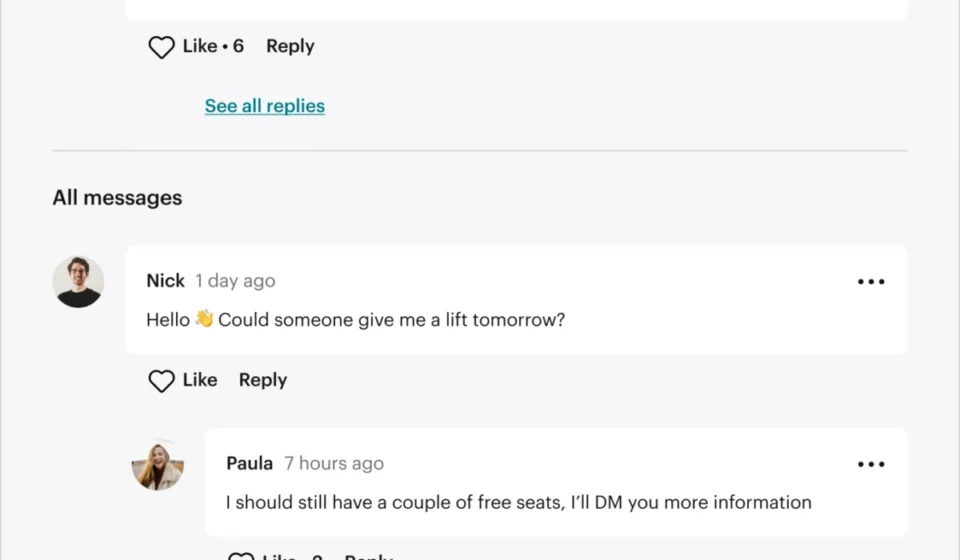
For regular users, navigating a group’s page is now significantly less confusing. When a member wants to chat about an upcoming hike or coding workshop, they no longer have to guess whether they should post in an Event Chat, an Event Comment section, or a Message Board. Every event-specific question lives in the comments, and every community-wide topic lives in the discussions. Combined with reliable notifications, members are far less likely to miss crucial updates regarding schedule shifts or venue changes.
Platform Health and Future Outlook
By cutting technical debt associated with maintaining legacy features that served redundant functions, Meetup’s engineering teams can now redirect resources toward future high-demand requests. While Message Boards and Event Chat are officially gone, the foundational stability achieved by this update sets a robust precedent for platform evolution.
As digital community spaces become increasingly competitive, Meetup’s pivot toward simplicity proves that sometimes, doing less—and doing it exceptionally well—is the ultimate key to empowering human connection.
Related posts: