Streamlining Community Engagement: Meetup Overhauls Its Communication Suite to Empower Organizers

SAN FRANCISCO — In the digital age of community building, clear, consistent, and intuitive communication is the bedrock of any thriving collective. Recognizing that fragmented and overlapping features can stifle rather than foster engagement, Meetup—the premier global platform for connecting people with shared interests—has rolled out a comprehensive overhaul of its communication tools.
Launched officially on July 18, 2024, and refined through subsequent updates, this strategic initiative aims to simplify the user experience for both organizers and members. By consolidating overlapping features, sun-setting redundant tools, and introducing heavily requested upgrades to its core messaging systems, Meetup is setting a new standard for digital community management.
Main Facts: What Changed in Meetup’s Communication Ecosystem?
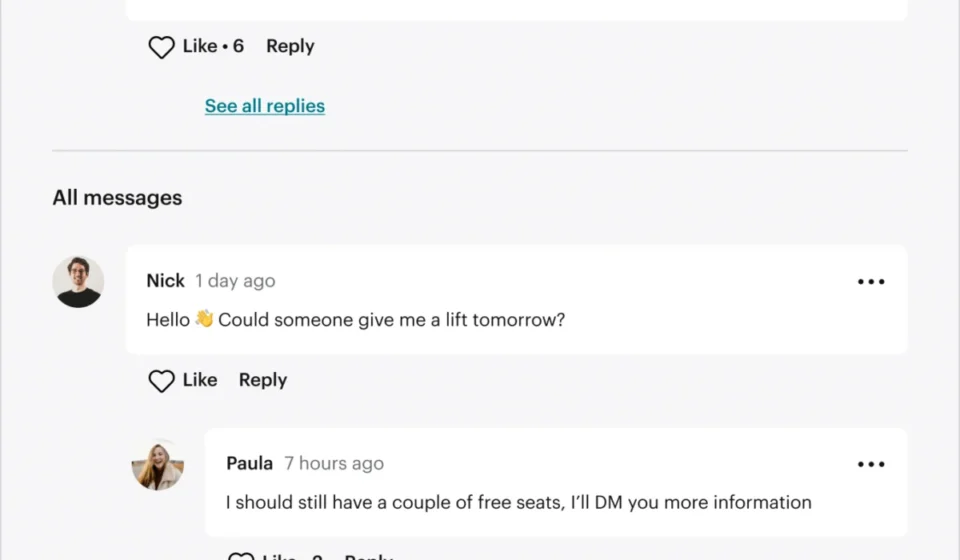
For years, Meetup offered a sprawling suite of communication channels that, while diverse, often left users overwhelmed. The platform historically supported Group Discussions, Event Comments, Event Chat, Message Boards, Direct Messages, Event Announcements, and mass email functionality via "Contact Members."
While certain tools served distinct purposes, others created significant functional overlap. Most notably, Event Chat and Event Comments performed nearly identical roles, leading users to interchange them randomly and making event-specific conversations disjointed and difficult to track. A parallel redundancy existed between Group Discussions and Message Boards.
To resolve this friction, Meetup executed a major consolidation strategy:

- Sunsetted Features: Message Boards and Event Chat have been officially retired.
- Retained Core Tools: Group Discussions and Event Comments were preserved as the primary avenues for community dialogue.
- Enhanced Functionality: The remaining tools received major upgrades, including markdown text support, comment pinning, and a total overhaul of the platform’s notification infrastructure.
Chronology of the Update: Listening to the Community
The journey toward a streamlined communication suite did not happen overnight. It was born out of an extended period of qualitative research, organizer surveys, and platform usage data analysis.
Phase 1: Identifying the Friction (Late 2023–Early 2024)
Meetup’s product and engineering teams identified that user complaints consistently centered around fragmented conversations. Organizers reported that members frequently missed updates because crucial information was split across too many disparate channels—such as posting a question on a Message Board when it was intended for a Group Discussion.
Phase 2: Organizer Consultations (Spring 2024)
Meetup directly surveyed its organizer base to determine which features were genuinely driving community value and which were just adding noise. The results were definitive: organizers overwhelmingly favored Group Discussions and Event Comments over Message Boards and Event Chat, citing them as far more straightforward, intuitive, and reliable. Usage metrics corroborated these findings, proving that the community naturally gravitated toward these two features anyway.
Phase 3: The Rollout (July 18, 2024)
On July 18, 2024, Meetup officially streamlined its offerings, retiring Message Boards and Event Chat while deploying the first wave of upgrades to Group Discussions and Event Comments.
Phase 4: Continuous Refinement (Summer–September 2024)
Following the initial cutover, Meetup’s engineering teams focused heavily on resolving long-standing issues regarding notification reliability, culminating in systemic code improvements that were fully integrated and reviewed by September 2024.
Supporting Data: Why Group Discussions and Event Comments Won
When digital platforms deprecate features, user pushback is a common risk. However, Meetup’s decision to sunset Message Boards and Event Chat was backed by empirical data regarding user behavior and direct feedback loops.
- Simplicity Wins: In organizer surveys, the simplicity of a threaded conversation model (Group Discussions) and real-time event-specific feedback (Event Comments) consistently outperformed the forum-style layout of Message Boards.
- Reduction of Fragmentation: Internal metrics showed that when given four different ways to talk about an upcoming event (Event Chat, Event Comments, Group Discussions, and Message Boards), user engagement became diluted. Consolidating down to Event Comments for specific gatherings and Group Discussions for overarching group topics instantly centralized community knowledge.
- Performance Reliability: Legacy systems powering the older chat tools suffered from scaling and notification latency issues. Directing all engineering resources toward stabilizing and enhancing Group Discussions and Event Comments allowed Meetup to drastically improve notification delivery rates for new messages, replies, and reactions.
Three Major Enhancements to the Core Communication Suite
Beyond trimming the fat, Meetup used this update to deliver features that organizers had been requesting for years. The platform focused its immediate development efforts on three high-impact upgrades:
1. Rich Text Formatting via Markdown
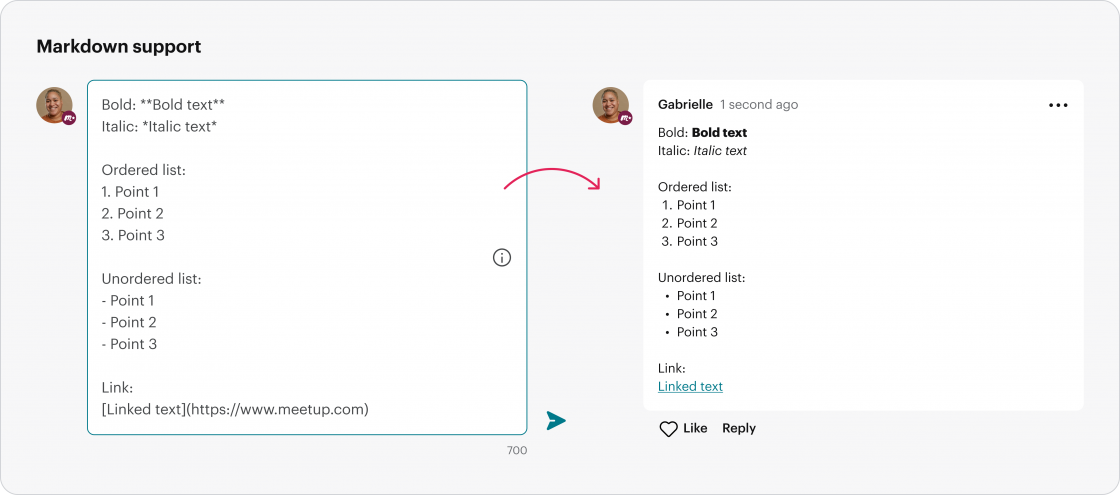
Historically, Meetup messages were strictly plain text, limiting the ability of organizers to emphasize key details or structure announcements. With the latest update, users can now utilize markdown formatting in Group Discussions and Event Comments.
- Organizers can now use Bold, Italics, ordered lists, unordered lists, and hyperlinks.
- This allows for cleaner, more readable announcements, making it vastly easier for members to parse important logistical details, external resource links, and meeting guidelines at a glance.
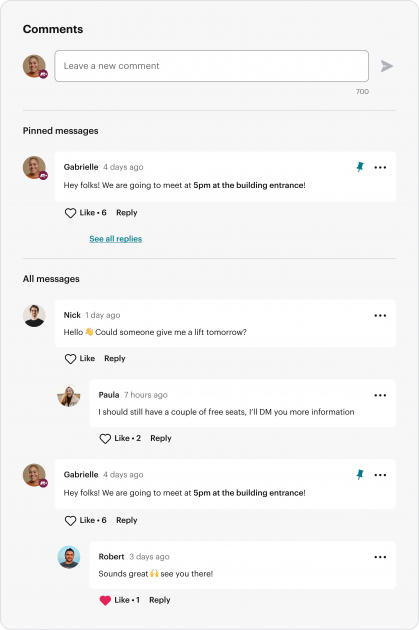
2. Pinning Important Comments
In busy event threads, crucial details—such as last-minute venue changes, parking instructions, or arrival timelines—frequently got buried under waves of general chatter.
- To combat this, Meetup introduced a comment-pinning feature.
- Organizers and co-organizers can now select up to three essential messages and pin them to the very top of an event’s Comments section.
- Members are greeted with vital notices the moment they open the event page. Pinning and unpinning can be managed instantly via a dedicated icon next to each message.
3. Bulletproof Notification Infrastructure
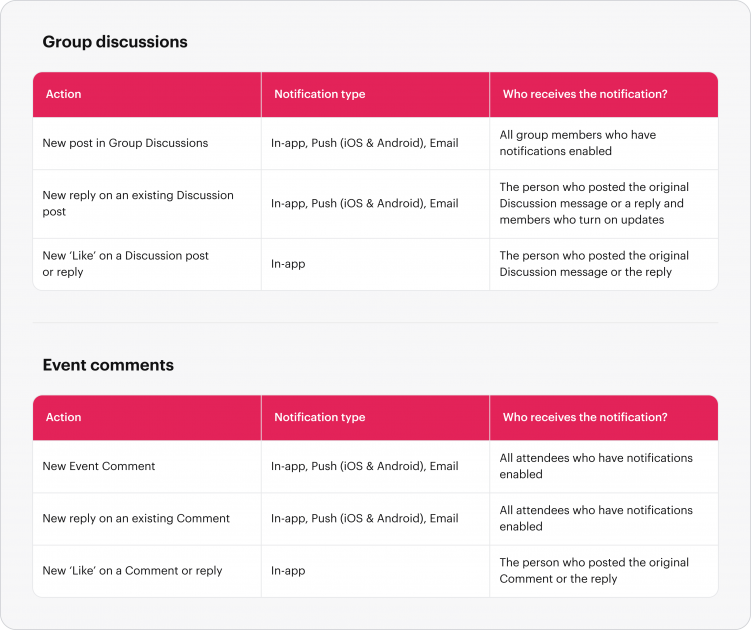
Perhaps the most critical technical improvement addresses a historical pain point: inconsistent notification delivery. For months, inconsistent alerts regarding new replies, comments, and reactions served as a primary source of frustration for community leaders.
- Meetup conducted a systematic audit of every notification trigger tied to Group Discussions and Event Comments.
- The engineering team prioritized and patched every broken notification path, ensuring that members and organizers receive timely alerts across web and mobile interfaces.
- Under-the-hood code optimizations were also deployed to ensure long-term stability and consistent background processing for these features.
Implications for Meetup Organizers and Members
The implications of this communication overhaul extend far beyond a cleaner user interface. For group organizers—many of whom run their communities on a volunteer basis—time is a precious commodity.
Streamlined Administration
By cutting out redundant tools, organizers no longer have to monitor multiple channels to ensure no member is left hanging. Administrative overhead is drastically reduced, allowing leaders to focus on what matters most: curating engaging events and building meaningful local connections.
Enhanced Member Retention
Clearer communication directly correlates with higher event turnout. When members receive reliable notifications, can easily read beautifully formatted event descriptions, and immediately see pinned parking instructions or schedule updates, the friction of attending a meetup drops significantly. This seamless experience fosters higher member satisfaction and stronger long-term group retention.
A Foundation for Future Innovations
By cleaning up legacy code and sunsetting underutilized, overlapping features, Meetup has built a more agile technological foundation. The platform noted that while it prioritized the most heavily requested features first, other community-suggested enhancements have been saved for future roadmaps.
Looking Forward
Communication remains the lifeblood of any community-driven platform. Meetup’s decisive action to simplify its toolkit demonstrates a willingness to listen to its user base and make difficult, data-backed cuts for the greater good of the ecosystem.
As communities continue to navigate the balance between digital coordination and real-world gatherings, these updates provide organizers with the refined, dependable instruments they need to bring people together effectively.
Organizers and members wishing to share their thoughts on the new communication suite are encouraged to submit feedback directly to the platform via Meetup’s official support and feedback portal.