
Bridging the Gap: How to Measure Social Media Business Impact Using Google Analytics 4

In the modern digital landscape, native social media analytics provide a wealth of surface-level data. They show marketers how content performs inside a specific ecosystem—tracking likes, shares, impressions, and video views. But a critical question remains unanswered within those native dashboards: What happens once a user clicks a link, leaves the platform, lands on a website, and ultimately converts?
Translating social media performance into tangible business outcomes is one of the defining challenges for modern marketing teams. While social media accounts for a substantial 10.12% of global website traffic—a number that climbs to 15.23% in digitally mature markets like the United States—proving its ultimate value to executive leadership is often an uphill battle.
According to data from the 2025 Impact of Social Media Marketing report, a striking 56% of marketing leaders feel their social teams lack true expertise in measuring the bottom-line business impact of their campaigns. To bridge this divide, brands are increasingly turning to Google Analytics 4 (GA4) to track social media performance once traffic leaves the native platforms, connecting top-of-funnel engagement with bottom-line revenue.
Main Facts: The Evolution of Social Attribution
The core challenge of social media marketing has never been generating attention; it has been proving return on investment (ROI). Native platforms excel at measuring community growth and on-platform engagement, but they are inherently limited when it comes to tracking multi-channel customer journeys.
Google Analytics 4 serves as a robust solution for tracking social media performance post-click. It provides a centralized ecosystem where marketers can observe how visitors from social channels behave once they arrive on a website. By integrating social strategies with GA4, organizations can move past "vanity metrics" and evaluate their true digital footprint.
The platform automatically sorts social traffic into two distinct buckets:
- Organic Social: Traffic arriving via non-ad links on social media sites. GA4 recognizes these via a regex list of known social networks or accepted mediums like
social,social-network, orsm. - Paid Social: Traffic driven by sponsored ad links. GA4 identifies this traffic when a recognized social source is paired with a paid medium parameter (such as
ppc,retargeting, orpaid).
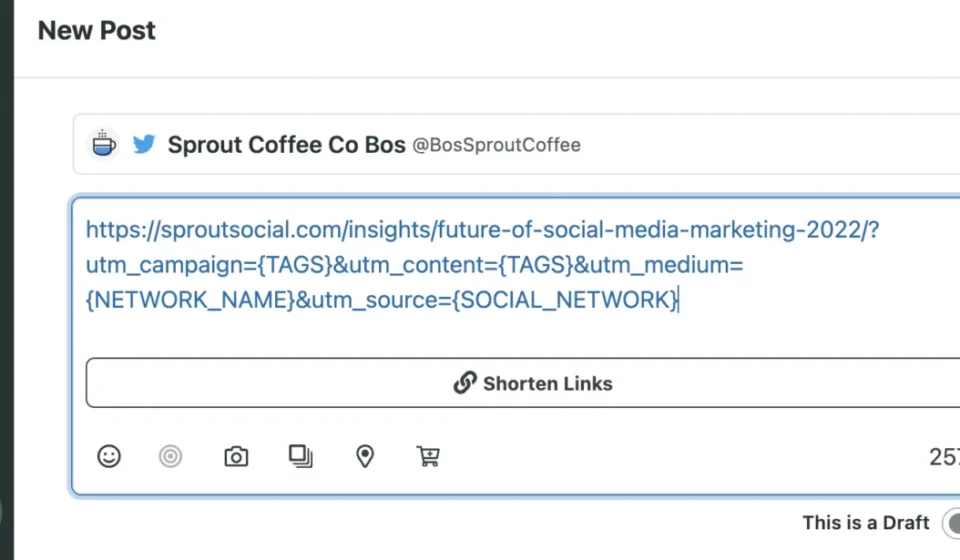
However, automatic tracking only tells part of the story. To gain granular visibility into specific campaigns, posts, and creators, marketers rely on Urchin Tracking Module (UTM) parameters. By appending specific tags to URLs—such as utm_source, utm_medium, and utm_campaign—brands can trace a website visitor back to a precise piece of content.
Chronology: From Vanity Metrics to Attribution Models
The journey of social media measurement has evolved through three distinct eras over the past decade:

- The Era of Vanity Metrics (Early 2010s): Social media success was measured primarily by audience size, follower growth, and total impressions. Brands prioritized audience accumulation over conversion pathways.
- The Shift Toward Engagement (Late 2010s): As algorithms matured, the focus shifted to engagement rates, comments, and shares. Marketers began recognizing that active community interaction was more valuable than passive follower counts, yet connecting these metrics to website conversions remained largely manual and disconnected.
- The Modern Attribution Era (2020s–Present): With the deprecation of third-party cookies and privacy shifts, the industry has pivoted toward holistic, first-party data tracking. GA4 has become the standard for blending web analytics with social media attribution, forcing social teams to speak the language of funnel metrics, key events, and customer lifetime value.
Supporting Data: Why Cross-Platform Measurement Matters
The disconnect between social media activity and financial reporting has real consequences for corporate budgeting and strategic planning. Key industry data highlights the urgency of adopting advanced analytics:
- 10.12%: The global share of website traffic originating from social media channels.
- 15.23%: The proportion of traffic driven by social media in digitally saturated markets like the United States.
- 44%: The percentage of marketing leaders who rate their social teams as experts in measuring true business impact (2025 Impact of Social Media Marketing report).
- 65%: The share of marketing leaders who state that connecting social media performance to broader business goals is the single most effective way to secure executive social investment (2025 Sprout Social Index).
These figures demonstrate that while audiences are actively moving from social platforms to corporate websites, internal organizational structures are often lagging in their ability to measure and justify that movement.
Official Perspectives and Industry Insights
As marketing departments face tightening budgets, executives are demanding deeper accountability from digital channels.
Industry analysts emphasize that social media can no longer operate as an isolated silo. Marketing directors and chief marketing officers (CMOs) are increasingly evaluating social managers not just on engagement rates, but on their ability to drive qualified leads, pipeline velocity, and direct sales.
Understanding the Audience Through GA4
Beyond tracking raw traffic volumes, GA4 provides deep demographic and behavioral context regarding social visitors. Brands can evaluate:
- Demographics: Are visitors from TikTok, LinkedIn, or Instagram matching the age, location, and language of the core buyer persona?
- Web Engagement: Metrics like Sessions, Engaged Sessions (visits lasting longer than 10 seconds, featuring a conversion, or viewing two or more pages), and Average Engagement Time help filter out accidental clicks, revealing genuine consumer interest.
Measuring Key Events and Conversions
To calculate true social ROI, marketers must define what success looks like on their website. GA4 utilizes key events (formerly known as conversions) to track valuable user actions.
While a default key event for e-commerce sites is typically a purchase, businesses can configure custom key events—such as a sign_up for a newsletter, a demo request, or a resource download. By tagging links properly and configuring these events in GA4, teams can run multi-channel attribution reports that reveal precisely which social campaigns drove the highest-value conversions.
Implications for Future Social Media Strategies
The integration of Google Analytics with social media management tools has profound implications for how digital marketing teams operate.

1. Operational Efficiency and Workflow Automation
Manually building and managing UTM parameters for dozens of daily posts across multiple platforms is prone to human error and administrative fatigue. Modern platforms have addressed this by integrating URL shorteners and UTM builders directly into publishing workflows—such as Sprout Social’s Bitly integration—allowing marketers to embed tracking parameters and shorten links with a single click.
2. Securing Executive Buy-In
When social media teams can present reports showing not just likes and comments, but revenue generation, customer acquisition cost (CAC), and conversion rates, the perception of social media shifts from a "brand awareness expense" to a "revenue-generating engine." This clarity is vital for securing long-term budget allocations and headcount approvals.
3. The Future of Closed-Loop Reporting
As tracking technologies evolve, the future belongs to closed-loop attribution. Marketers who master the synergy between native social insights and GA4 will be uniquely positioned to optimize their messaging in real time, shifting ad spend and organic efforts toward the exact content formats, platforms, and campaigns that deliver real-world business growth.
Frequently Asked Questions
Can Google Analytics track social media?
Yes. Google Analytics tracks traffic originating from various social networks, alongside visitor behavior on your site—including pages visited, time spent on page, and downstream user actions.
How do I set up Google Analytics for social media tracking?
GA4 automatically tracks traffic and events from social media platforms. However, to track specific posts, campaigns, or creators, you must utilize UTM parameter tagging on your links and monitor the corresponding data within your acquisition reports.
What social media metrics can GA4 not track?
GA4 cannot track on-platform social performance metrics that remain native to the social network. This includes metrics such as follower growth rate, native video watch time, profile views, post impressions, and organic reach within specific social apps.
What is the difference between Organic Social and Paid Social in GA4?
Organic Social captures unpaid website visits resulting from non-sponsored links on social networks. Paid Social tracks traffic explicitly generated by sponsored advertisements and paid promotional campaigns.
How do I identify which social platform drives the most traffic?
In your GA4 dashboard, navigate to your traffic acquisition reports and look at the Session source/medium dimension. You can filter or sort this data to isolate specific networks (e.g., facebook/referral, linkedin/social) and compare their respective traffic volumes and engagement rates.