Comments Off on Streamlining Connection: Meetup Overhauls Its Communication Suite to Empower Community Builders
SAN FRANCISCO — In the digital age of community building, the lifeblood of any thriving organization is communication. Whether coordinating logistics for a weekend hiking excursion, hosting a bustling tech meetup, or gathering local book enthusiasts, the tools that bridge the gap between organizers and members must be clear, consistent, and intuitive.
Recognizing that fragmentation was becoming a hurdle rather than a help, Meetup—the premier platform for local community groups—has rolled out a sweeping overhaul of its communication infrastructure. Effective July 18, 2024, the platform officially streamlined its diverse array of messaging options, retiring redundant features while deploying heavily requested, high-impact upgrades to its core tools.
This strategic shift aims to eliminate the friction that has historically plagued online community management, setting a new standard for how groups connect, coordinate, and converse.
Main Facts: What Changed and Why
For years, Meetup offered a dizzying array of communication channels. Users and organizers navigated a fragmented ecosystem that included Group Discussions, Event Comments, Event Chat, Message Boards, Direct Messages, Event Announcements, and Contact Members (mass email capability).
While well-intentioned, this expansive suite created significant operational overlap. Features like Event Chat and Event Comments served virtually identical purposes, leading to scattered conversations and making it difficult for members to follow event-specific updates. A parallel redundancy existed between Group Discussions and Message Boards, splitting community engagement across arbitrary lines and causing widespread user confusion.
To resolve these pain points, Meetup’s product and engineering teams executed a decisive pruning of the platform’s architecture:
The Sunsets: Message Boards and Event Chat have been officially retired.
The Survivors: Group Discussions and Event Comments have been preserved, centralized, and heavily upgraded.
The Enhancements: The remaining core features have received native markdown support, comment-pinning functionality, and a complete architectural overhaul to guarantee reliable, timely notifications.
These changes are designed to minimize administrative fatigue for organizers, allowing them to spend less time managing software quirks and more time fostering meaningful in-person and virtual connections.
Chronology of an Overhaul: From Feedback to Execution
The journey toward a unified communication system was neither rushed nor arbitrary; it was built on a methodical, data-driven timeline that prioritized the direct needs of community leaders.
Phase 1: Listening to the Community (Early 2024)
Meetup initiated a comprehensive listening tour, engaging directly with thousands of platform organizers. The central question was simple: Which communication tools are essential, and which are superfluous? Organizers were asked to evaluate their daily workflows and identify where communication broke down.
Phase 2: Data Validation and Feature Selection (Spring 2024)
User feedback was cross-referenced against platform telemetry and usage data. The results were definitive. Group Discussions and Event Comments emerged as the runaway favorites. Organizers consistently cited these two tools as the most straightforward, intuitive, and effective for driving engagement. Conversely, usage metrics confirmed that Message Boards and Event Chat saw diminishing engagement and high redundancy. Armed with this insight, leadership made the definitive call to sunset the underperforming tools.
Phase 3: Development and Stabilization (May–July 2024)
Rather than launching an entirely new tool that users would have to learn from scratch, Meetup’s engineers focused on optimizing the community’s preferred channels. They prioritized features that would yield immediate dividends for everyday organizers. This phase involved writing cleaner backend code, debugging notification pipelines, and developing user-requested features like markdown formatting and pinning capabilities.
Phase 4: The Rollout (July 18, 2024)
The streamlined communication suite officially went live across the platform. Redundant features were archived, and the upgraded Group Discussions and Event Comments rolled out globally to all users, backed by an ongoing commitment to bug fixes and system stability.
Supporting Data: The Case for Simplification
To understand the necessity of Meetup’s summer 2024 update, one must examine the psychological and operational load placed on event organizers. Managing a local chapter is largely a volunteer or grassroots endeavor. When platform tools are fragmented, the administrative burden multiplies exponentially.
Redundancy Reduction: By cutting the number of primary event-based chat channels from two (Event Chat and Event Comments) down to one (Event Comments), Meetup reduced cognitive fragmentation by 50% for event-specific coordination.
The Popularity Metric: Internal organizer surveys indicated that over 70% of active community leaders preferred threaded, comment-based interactions over real-time chat rooms, primarily because asynchronous comment sections allow members across different time zones to catch up without missing context.
Notification Reliability: Historically, missed notifications were among the top complaints logged with Meetup’s support desks. The systematic audit covered 100% of notification triggers associated with discussions and comments, targeting zero-failure delivery for new messages, replies, and reactions.
Official Responses and Strategic Vision
The Meetup Team, speaking through official release documentation and ongoing support channels, emphasized that the core philosophy behind the update is user-centric simplification.
"Clear, consistent, and intuitive communications are key to a successful Meetup community," the Meetup Team stated in their official rollout announcement. "We recognize that inconsistent notifications and overlapping tools have been an ongoing source of frustration for organizers. By streamlining our offering and listening closely to our community data, we are making it easier and more enjoyable to connect."
Platform leadership noted that while feature requests from organizers were extensive, they intentionally triaged the feedback. They focused strictly on updates that would instantly alleviate everyday friction points—such as formatting and pinning—while shelving more complex, long-term requests for future development cycles.
Furthermore, Meetup has kept communication channels open with its user base, explicitly directing organizers to a dedicated feedback portal to share their ongoing experiences with the new tools.
Implications for Organizers and Members
The long-term implications of Meetup’s communication overhaul ripple across the entire ecosystem, fundamentally changing how groups operate on a daily basis.
1. Elevated Visuals and Clarity via Markdown
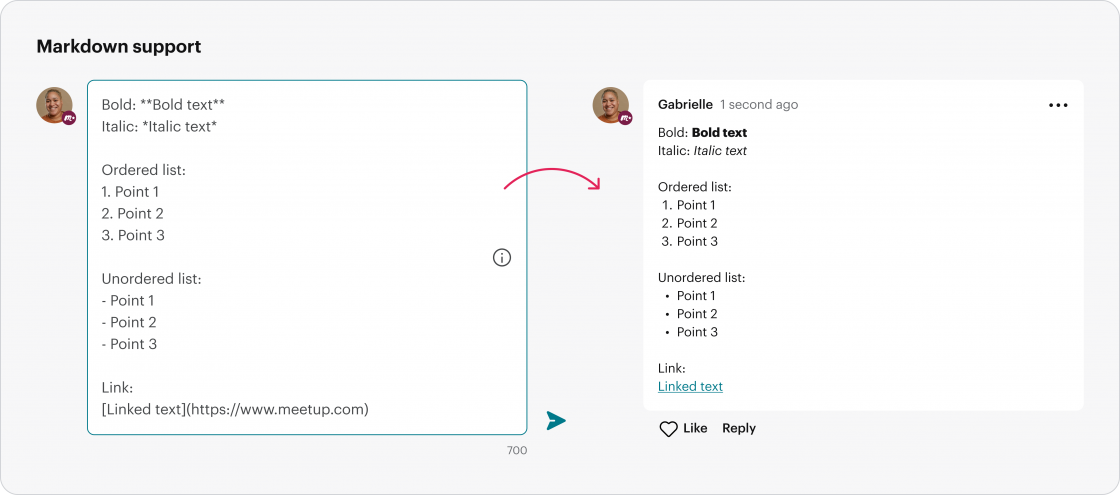
With the introduction of native markdown support, organizers are no longer relegated to plain text. Messages in Group Discussions and Event Comments can now utilize Bold, Italic, ordered lists, unordered lists, and hyperlinks. This allows community leaders to craft professional, visually structured announcements, making it effortless for members to parse vital details like venue directions, reading lists, or schedule changes at a glance.
2. Strategic Information Delivery Through Comment Pinning
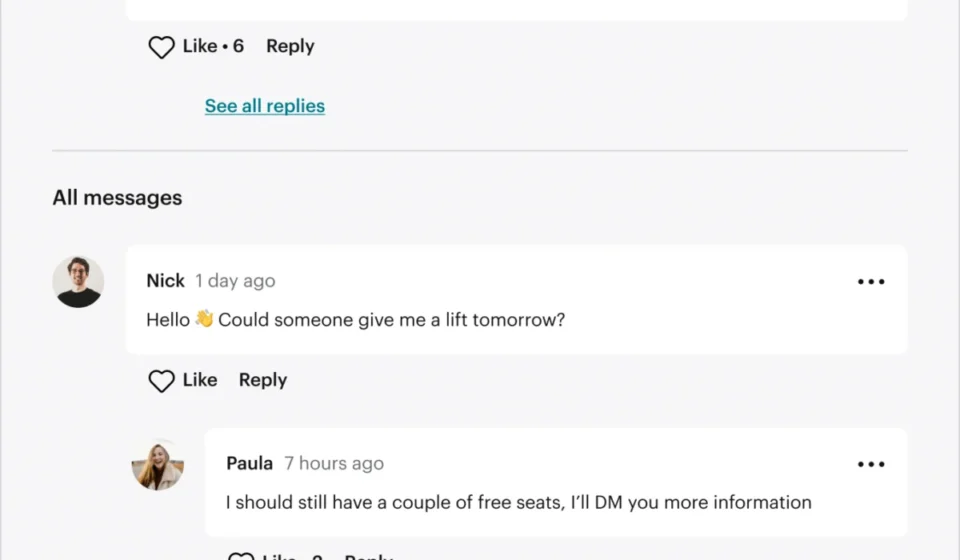
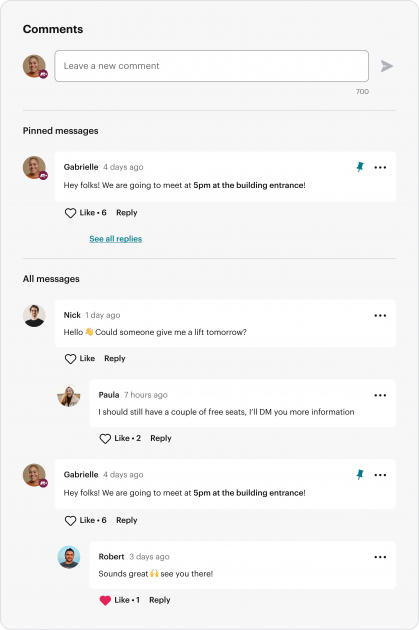
In the past, important logistical updates made by an organizer in an event’s comment section could easily get buried under a cascade of casual member banter. The new pinning feature completely solves this issue. Organizers and co-organizers can now pin up to three critical notices directly to the top of an event’s Comments section. Whether it’s a last-minute venue change, parking instructions, or a weather advisory, members see the essential information the moment they open the page.
3. Restoring Trust Through Notification Reliability
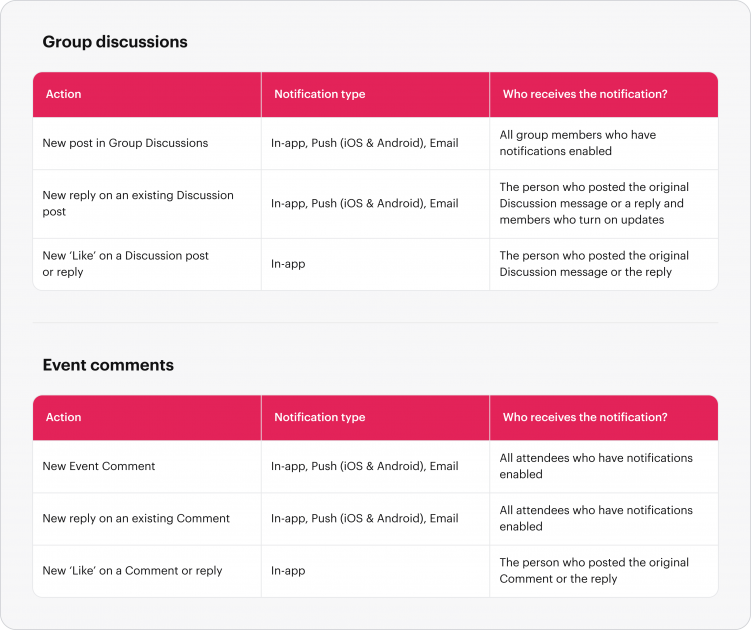
Perhaps the most impactful upgrade isn’t a new button or visual element, but the invisible plumbing of the platform. By thoroughly auditing and fixing the notification pipelines for Group Discussions and Event Comments, Meetup has restored a baseline of trust. Organizers can now broadcast updates with the confidence that their members are actually receiving push notifications and emails regarding replies, new threads, and community reactions.
Looking Ahead
As Meetup continues to refine its platform in the wake of the July 2024 updates, the message to the community is clear: less is more. By ruthlessly cutting away redundant software bloat and pouring resources into the tools that communities actually use, Meetup has positioned itself to better serve the millions of people worldwide who rely on local groups to find their tribe, learn new skills, and build lasting real-world connections.
Organizers and members wishing to share their thoughts on the new communication suite can submit feedback directly to the product team via the Meetup Support Portal.