
Beyond Vanity Metrics: How to Bridge the Gap Between Social Media Performance and Business Outcomes Using GA4

Introduction: The Accountability Crisis in Modern Marketing
For over a decade, social media marketing has labored under the heavy shadow of "vanity metrics." Likes, shares, and follower counts have long served as the default scorecards for brand performance, offering a superficial glimpse into audience sentiment. Yet, as corporate budgets tighten and executive boards demand hard evidence of return on investment (investment), these native platform metrics are no longer enough.
The core challenge facing modern marketers is a fundamental disconnect: native social analytics show how a brand performs inside a specific platform, but they go dark the moment a user clicks a link and enters a corporate website. How do brands track performance once those clicks turn into website traffic—and ultimately, bottom-line revenue?
According to the 2025 Impact of Social Media Marketing report, only 44% of marketing leaders rate their social teams as experts in measuring actual business impact. This skills gap persists even as social media solidifies its role as a primary digital driver. Globally, social media accounts for 10.12% of all web traffic, a figure that surges to 15.23% in socially mature markets like the United States.
To bridge this divide, forward-thinking organizations are turning to Google Analytics 4 (GA4). By combining native platform data with robust web analytics, brands can finally construct a comprehensive, closed-loop view of how social media drives broader business goals.
Main Facts: The Evolution of Social Tracking in the GA4 Era
The integration of social media data into Google Analytics represents a massive shift in how organizations evaluate digital performance. Rather than viewing social media as a standalone brand-awareness channel, GA4 treats it as an integral component of the multi-channel acquisition funnel.
At its core, Google Analytics provides the missing link between social engagement and downstream business outcomes. While native platform insights tell marketers who is interacting with a post, GA4 reveals what those users do once they arrive on a website. Do they bounce immediately? Do they browse multiple product pages? Do they complete a purchase or fill out a lead generation form?
The importance of answering these questions cannot be overstated. Data from the 2025 Sprout Social Index reveals that 65% of marketing leaders consider connecting social media performance to broader business goals as the single most effective way to secure executive social investment. Without this connection, social teams remain vulnerable to budget cuts during economic downturns.
Chronology: From Simple Referral Tracking to Advanced Key Events
To understand how modern social media tracking evolved, it is helpful to trace the technical transition from legacy analytics platforms to the modern GA4 architecture.
The Universal Analytics Era (Pre-2023)
In the era of Universal Analytics (UA), social traffic was largely lumped into generic "Referral" buckets unless explicit custom tracking parameters were applied. Marketers relied heavily on "Goals" to track conversions, which often required complex setups and lacked the event-based flexibility demanded by modern web applications.
The Advent of GA4 and Event-Based Tracking
With the industry-wide migration to Google Analytics 4, Google transitioned entirely to an event-based data model. Every user interaction—from a page view to a video start or a file download—is now captured as an event.
The Evolution of Conversions to "Key Events"
In a recent terminology update, Google redefined how conversion actions are classified within GA4. Actions that were previously labeled simply as "conversions" are now divided into two distinct categories:

- Key Events: Valuable user actions on a website or app tracked natively within GA4.
- Conversions: Specific key events shared directly with Google Ads to optimize paid bidding strategies and ad campaign performance.
This chronological shift has given social media marketers unprecedented precision, allowing them to isolate organic and paid social traffic streams and evaluate them against micro and macro-conversions with surgical accuracy.
Supporting Data: Dissecting Social Traffic in GA4
Understanding how GA4 categorizes incoming traffic is the first step toward accurate reporting. GA4 splits social traffic into two distinct channels: Organic Social and Paid Social. Each is governed by specific platform logic.
| Channel | Description | Verbatim Logic Summary | Typical Example Source/Medium |
|---|---|---|---|
| Organic Social | Users visiting a site/app using non-ad links on social media platforms. | Source matches a regex list of social sites OR Medium equals (social, social-network, social-media, sm, social network, social media). | instagram / social |
| Paid Social | Users visiting a site/app using paid ad links on social media platforms. | Source matches a regex list of social sites AND Medium matches regex ^(.*cp.*|ppc|retargeting|paid.*)$. |
facebook / paid |
Mastering UTM Parameters and Link Hygiene
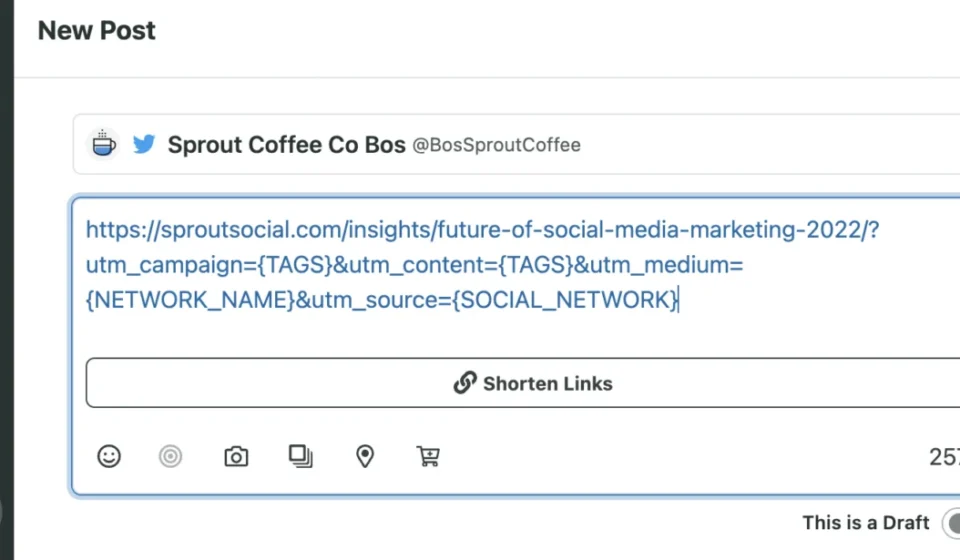
While GA4 automatically catches a vast amount of social traffic via its built-in recognition rules, marketers often need granular visibility into specific campaigns, ad variations, or individual posts. This is where UTM (Urchin Tracking Module) parameters become essential.
A properly tagged link appends specific tracking variables to a destination URL:
https://www.example.com/spring-collection?utm_source=facebook&utm_medium=social&utm_campaign=spring_launch
However, manual UTM tracking quickly becomes unwieldy for time-strapped marketing teams managing multiple platforms, dozens of campaigns, and hundreds of posts. To combat this administrative overhead, modern social management platforms—such as Sprout Social’s integration with Bitly—allow marketers to shorten UTM-tagged links with a single click directly inside the post-composition window, eliminating the need for sprawling, error-prone spreadsheets.
Essential GA4 Social Metrics
To demonstrate true return on investment, digital marketers should focus on four core categories of metrics within GA4:
- Audience (Demographics): Tracks location, age, and language to confirm whether social content is successfully attracting the target buyer persona.
- Acquisition (Session Source/Medium): Identifies the exact platform (e.g.,
facebook/referral) or campaign driving the highest volume of visitors. - Web Engagement (Sessions & Engaged Sessions): Filters out accidental clicks by measuring visits lasting longer than 10 seconds, featuring a conversion, or viewing two or more pages.
- Web Engagement (Average Engagement Time): Measures the average duration users actively spend on site content, validating whether on-site experiences match the promises made in social posts.
Official Responses and Strategic Perspectives
Industry experts and analytics professionals consistently emphasize that social media cannot operate in an isolated data silo.
"When marketing leaders view social metrics purely through the lens of platform-native dashboards, they miss the broader commercial narrative," notes enterprise analytics consultant Marcus Vance. "Executives don’t fund social media because a post went viral; they fund it because that viral moment successfully funneled high-intent buyers into the checkout flow. GA4 is the bridge that translates social engagement into the language of the boardroom."
Furthermore, data privacy shifts and cookie deprecation have made first-party attribution more critical than ever. Platform algorithms change constantly, organic reach fluctuates, and ad costs rise. Against this backdrop, web analytics data captured via GA4 provides a stable, independent source of truth that brands can rely on to evaluate multi-channel performance objectively.
Implications: Building a Closed-Loop Social Strategy
The transition toward rigorous, analytics-backed social measurement carries profound implications for digital marketing teams, agency structures, and corporate budgeting processes.
1. The Shift from Creatives-Only to Data-Fluent Teams
Social media managers can no longer succeed purely on aesthetic design and copywriting skills. The modern social practitioner must be data-fluent—capable of auditing UTM structures, configuring GA4 key events, and interpreting attribution models. Upskilling social teams in web analytics is no longer optional; it is a core competency.

2. Justifying Executive Investment
By connecting social traffic directly to downstream business outcomes like lead generation, pipeline velocity, and e-commerce revenue, marketing leaders can reliably prove social media ROI. This data-driven narrative makes it significantly easier to secure increased headcount, software budgets, and paid media spend during annual planning cycles.
3. Workflow Streamlining and Unified Reporting
As organizations scale their digital footprints, the administrative friction of tracking links across disparate spreadsheets and analytics dashboards threatens campaign agility. Solutions that integrate direct social publishing with automated UTM generation and closed-loop Google Analytics reporting—such as Sprout Social’s comprehensive suite—allow teams to focus on strategy and creativity rather than manual data entry.
Conclusion
Social media has evolved far beyond a digital bulletin board for brand awareness. Today, it functions as a primary engine for customer acquisition, community building, and direct revenue generation. By embracing Google Analytics 4 to track organic and paid social traffic, tag campaigns with precision, and measure meaningful key events, brands can finally close the loop on their digital marketing efforts.
The path forward requires moving past vanity metrics, empowering social teams with the right analytics tools, and translating every click, share, and conversion into undeniable business growth.
FAQs: Tracking Social Media in GA4
Can Google Analytics track social media?
Yes. Google Analytics tracks traffic originating from various social networks, alongside granular user behavior and actions on-site, including visited pages, session duration, and conversion events.
How do I set up Google Analytics for social media tracking?
GA4 automatically captures basic traffic and events from social media via default channel groupings. However, for precise campaign-level tracking, marketers should utilize UTM tagging to label specific posts, links, and promotional initiatives.
What social media metrics can GA4 not track?
GA4 cannot track on-platform performance metrics that occur exclusively within specific social media apps. This includes native metrics such as follower growth rates, video view counts inside the native app, profile visits, and organic post impressions.
Organic Social vs. Paid Social: What is the difference in GA4?
In GA4, Organic Social represents unpaid visits generated via non-ad links on social platforms, whereas Paid Social tracks traffic driven by sponsored advertisements and paid social campaigns.
How do I see which social platform drives the most traffic?
To identify top-performing social channels in GA4, navigate to your traffic acquisition reports, set your primary dimension to "Session source/medium," and filter or sort by the channels matching recognized social media referral patterns.
Related posts: