
The Anatomy of a Flawless Event Check-In: Mastering QR Code Strategy for Peak Attendance

When the clock strikes 8:00 a.m. on the first day of a major conference, the atmosphere should be one of anticipation. Instead, for many event organizers, it is a moment of high-stakes tension. As hundreds of attendees converge at the registration desk simultaneously, the failure of a single QR code can trigger a cascading operational nightmare: check-in lines snake toward the lobby entrance, staff are forced to abandon automated systems for slow, manual lookups, and the attendee experience—the very first touchpoint of your event—is marred by frustration.
The difference between a seamless arrival and a chaotic bottleneck often comes down to a fundamental misunderstanding of what a QR code actually is. In the high-pressure environment of event registration, a QR code is not a marketing tool, a design flourish, or a vessel for aesthetic vanity. It is an identity key. When handled correctly, it acts as the bridge between a physical attendee and a live, digital registration record. When handled poorly, it is the weak link that compromises your entire event infrastructure.
The Identity Key: Shifting the Paradigm
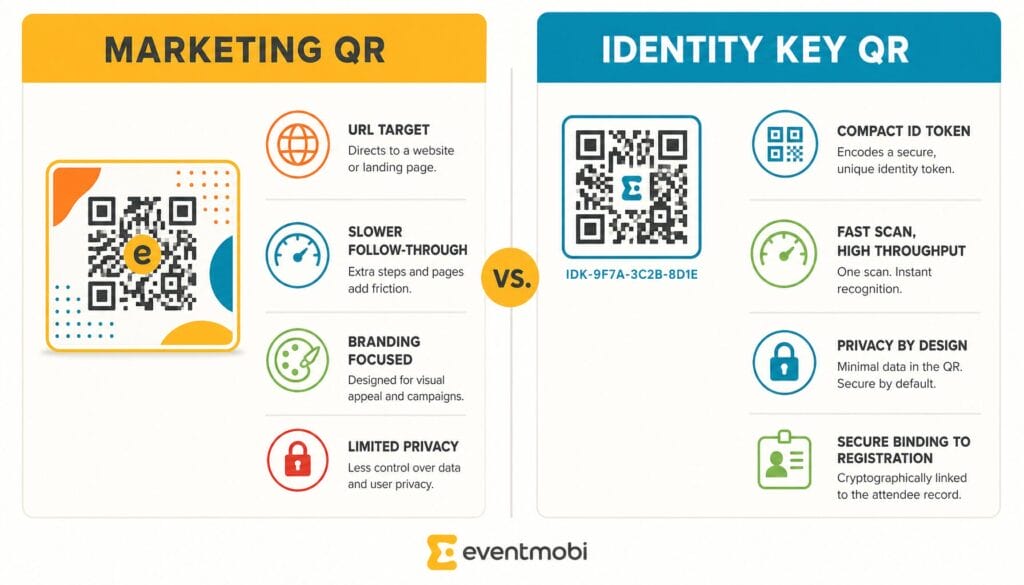
The common mistake many planners make is treating an event badge QR code like a marketing QR code—the kind you find on a restaurant menu or a billboard. Marketing QR codes are designed to send users to a "destination," such as a URL, a social media profile, or an app store. They are inherently external.
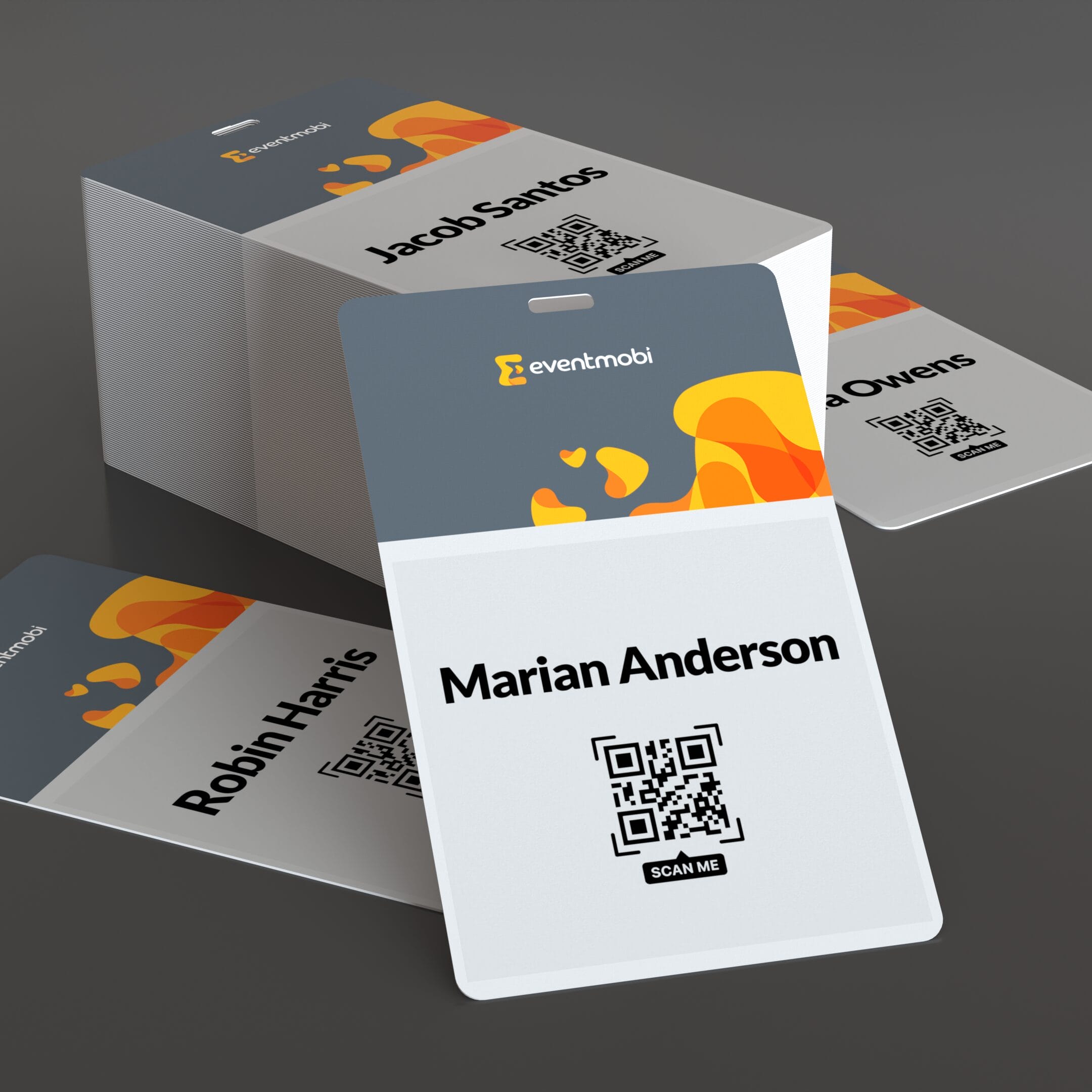
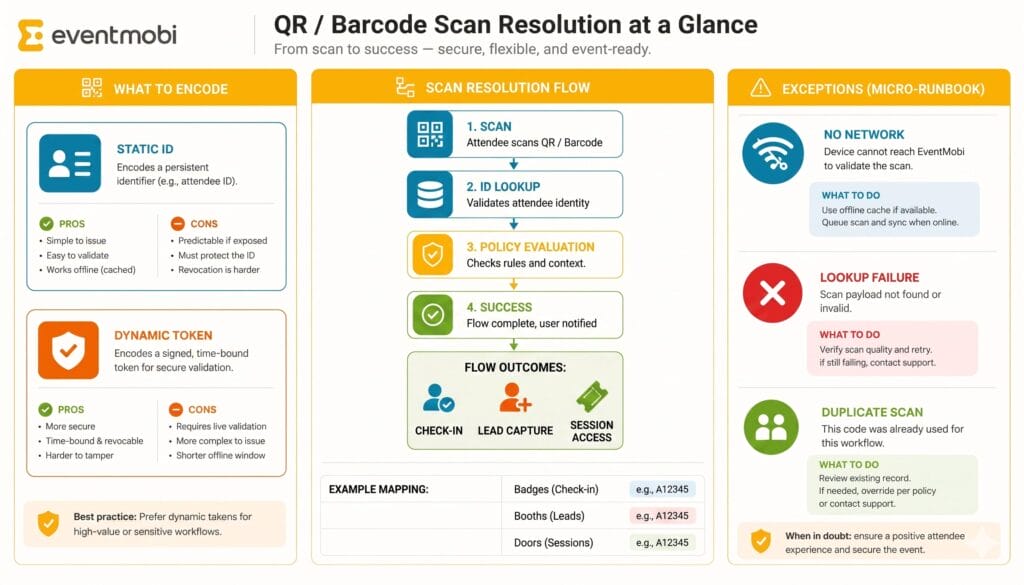
An event badge, however, requires an internal, secure, and lightning-fast connection to your system-of-record. When an attendee approaches the check-in counter, the scanner must instantly resolve the code to a specific, unique attendee record. This process must occur in under two seconds to maintain the "flow" of a busy venue. If the scan takes longer, or if the system returns an error, the latency isn’t just a technical glitch; it is an operational failure.
The risk isn’t that QR technology itself is unreliable. It is that organizers often separate the data source from the badge generation process. By treating the QR code as a static piece of information rather than a dynamic pointer, organizers invite common problems: stale exports, duplicate records, and the "missing registrant" syndrome, where last-minute sign-ups are nowhere to be found in the pre-printed badge pile.
From Registration to Reality: The Chronology of a Scan
To ensure absolute reliability, the journey of an attendee’s data must be linear and uninterrupted. The following "gold standard" workflow is the only way to ensure that the code on the badge matches the person wearing it:
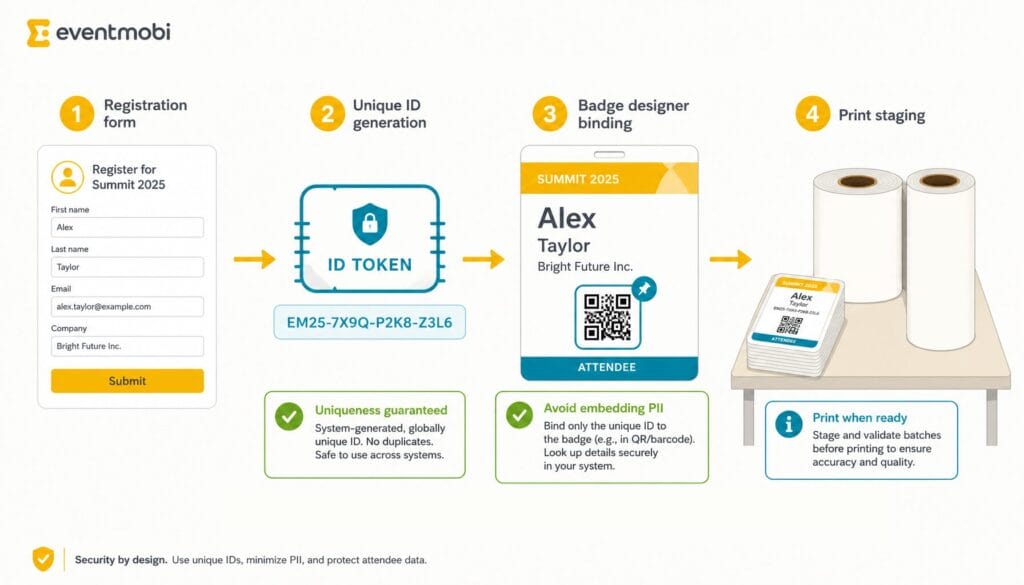
- Registration: The attendee enters their information into the event platform. This creates the primary system-of-record.
- Unique Identifier Generation: The platform automatically assigns a Universally Unique Identifier (UUID) or a specific Registration ID (e.g., REG-000123) to that record. This is crucial. Names are not unique; IDs are. Relying on names leads to collisions where assistants, family members, or colleagues with the same name cause database confusion.
- Badge Binding: The badge template is linked to this ID. When the printer receives the command, it pulls the data directly from the live record and encodes the QR code with that specific, unique ID.
- On-Demand Printing: By printing at the point of check-in, you eliminate the risk of lost badges or pre-sorting errors.
The "anti-pattern" that causes the most onsite pain is the use of static spreadsheets or manual, multi-step exports. If you export a list to a third-party badge printer, update the list, and then try to re-import or manually map those changes, you create a "brittle" chain. If that chain breaks, your scan logs will not reconcile with your registration data, leaving you with incomplete attendance reports and a massive headache during the post-event wrap-up.
Supporting Data: Why Engineering Matters
The technical standard for QR codes is ISO/IEC 18004. While this is the language of scanner vendors, the practical application for event planners involves "quiet zones" and data density.
When generating your codes, avoid the temptation to store PII (Personally Identifiable Information) like email addresses or phone numbers inside the QR code itself. Doing so increases the complexity and physical size of the code, making it harder for scanners to read under the mixed, often harsh lighting of a convention center. Instead, encode the Unique Identifier. This keeps the code simple, small, and highly scannable, even if the attendee’s badge is slightly wrinkled or the lighting is poor.
Technical Print Specifications for Success
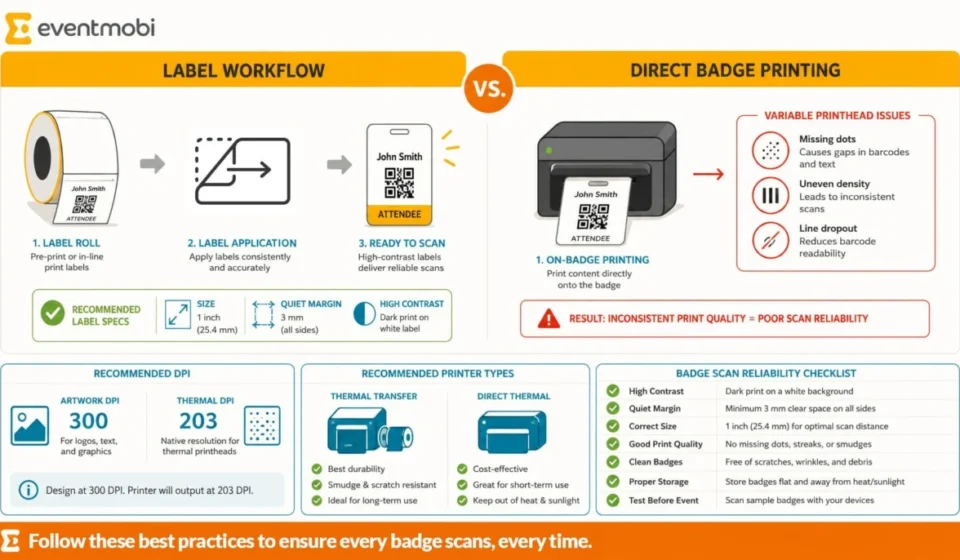
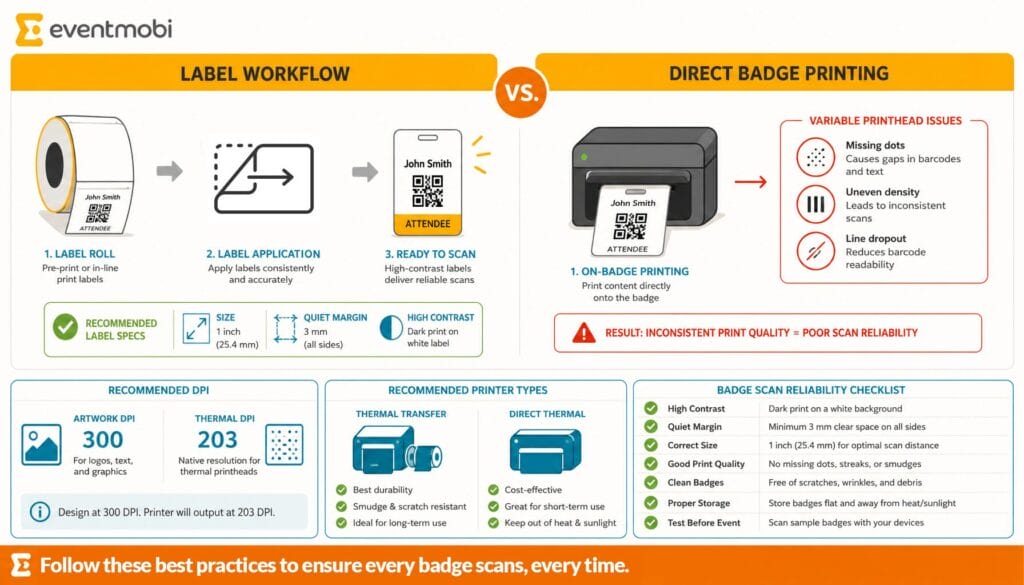
- Resolution: Aim for a minimum of 300 DPI for printed elements.
- Contrast: High contrast is non-negotiable. Black code on a white background is the industry standard for a reason.
- Quiet Zone: Ensure there is adequate "white space" around the QR code. If the design bleeds into the code, the scanner will struggle to define the edges.
- Label-on-Badge: Using a direct thermal printer to apply a label to a pre-printed badge stock is often superior to printing directly onto the badge. It allows for higher contrast, clearer lines, and easier reprints if an error occurs.
Official Operational Standards: The "Two-Tries" Rule
Even with the best technology, human error at the check-in desk is inevitable. Your staff should be trained on a "two-tries" service level agreement (SLA).
If a badge fails to scan on the first try, the staff member should quickly adjust the angle to reduce glare. If the second try fails, they should immediately pivot to a manual search. This keeps the queue moving. The "micro-runbook" for your staff should be simple:
- Scan.
- If fail: adjust angle, re-scan.
- If fail again: look up by Last Name/Email.
- Verify identity, print new badge/label.
By separating the "Fast-Track" lane (for those with functioning codes) from the "Help Desk" lane (for those needing manual assistance), you prevent a single, complex registration issue from backing up the entire event.
Implications for the Future of Event Management
The shift toward "Dynamic Identity Keys" has profound implications for the event industry. It allows for real-time tracking that goes far beyond simple entry. A well-constructed system allows you to:
- Session Entrance Tracking: Monitor capacity in real-time by scanning attendees at the doors of breakout rooms.
- Exhibitor Lead Retrieval: Enable exhibitors to scan badges, instantly creating a lead record while adhering to GDPR and data-sharing preferences.
- Restricted Access: Automatically deny entry to areas for which the attendee does not have the correct permissions.
These workflows are only possible when the QR code is treated as a living piece of data. When you invest in a unified platform—like EventMobi’s BadgeON—you are essentially removing the "seams" between registration and arrival. By pairing an iPad with a wireless printer, you remove the reliance on large, clunky hardware and expensive, static badge banks. You move to an agile model where the badge is created at the moment of arrival, ensuring 100% accuracy and maximum efficiency.
Conclusion: The Invisible Infrastructure
When executed perfectly, event check-in is an "invisible infrastructure." The attendee approaches, a quick beep confirms their status, and they are handed their credentials in seconds. They feel welcomed, not processed.
The path to this level of efficiency is paved with disciplined data management, rigorous pre-event testing, and a commitment to the "identity key" model. By running a 48-to-72-hour pre-event print drill, testing your scanners under venue-specific lighting, and training your staff to handle the inevitable exceptions with grace, you protect your brand and ensure that the first impression you make is one of professional competence.
In the end, the badge is more than a piece of plastic or cardstock; it is the physical representation of your attendee’s relationship with your event. Treat the QR code with the technical respect it deserves, and your check-in process will move from a source of stress to a pillar of your event’s success.
Are you looking for an integrated event platform that streamlines registration, check-in, and professional-grade badge printing? Explore EventMobi’s badge design and printing solutions to ensure your next event is seamless from the first scan.
Related posts: