BlackRAW Studio Brings Advanced Blackmagic and ProRes RAW Editing and Grading to the iPhone

By Tech & Filmmaking Desk
Published: October 2026
Main Facts
The landscape of mobile filmmaking has taken another monumental leap forward with the official release of BlackRAW Studio, a powerful new iOS application designed to bridge the gap between high-end professional cinema cameras and pocket-sized devices. Formerly known to early adopters as BlackRAW Visor—a niche utility primarily built for previewing raw footage on the go—the newly rebranded application has evolved into a robust mobile workstation.
BlackRAW Studio empowers videographers, cinematographers, and mobile creators to review, color correct, trim, and edit demanding professional video formats directly on their iPhones. Crucially, the app offers native compatibility with heavy-hitting cinema codecs, including Blackmagic RAW (BRAW) and Apple ProRes RAW, alongside standard industry formats like ProRes, H.264, and HEVC.
Rather than positioning itself as a replacement for desktop heavyweights like DaVinci Resolve or Adobe Premiere Pro, BlackRAW Studio is engineered as an on-the-go asset management and grading companion. It allows creators to ingest footage directly from external USB-C drives via the iOS Files app or their native Photos library, build lightweight timelines, apply sophisticated color grades, and export proxy files or fully graded sequences.
The app is free to download on the Apple App Store, with advanced export capabilities locked behind a Pro tier. Subscription options include a $4.99 monthly plan, a $39.99 annual subscription, or a $69.99 one-time lifetime purchase.
Chronology of Development: From Visor to Studio
To understand the significance of BlackRAW Studio, it helps to trace its evolution within the mobile video ecosystem.
The Limitations of Early Mobile Video Monitoring
In the early days of high-bitrate mobile recording, capturing footage in formats like ProRes or leveraging external accessories to shoot in raw was a logistical nightmare for quick turnaround workflows. While modern iPhones boast incredible internal video capabilities—capable of recording Apple ProRes natively and outputting LOG profiles—professional external cinema cameras shooting Blackmagic RAW or ProRes RAW presented a massive hurdle. Cinematographers utilizing external field monitors or offloading cards to iPhones were routinely stonewalled by the device’s inability to natively read, play back, or manipulate these proprietary, data-heavy raw formats without lengthy transcoding processes.
The Birth of BlackRAW Visor
Months prior to the current release, the development team launched a rudimentary tool called BlackRAW Visor. As the name implies, its functionality was strictly limited to playback. It gave on-set technicians, directors, and directors of photography (DPs) a way to quickly inspect BRAW footage files on an iPhone screen to check focus, exposure, and framing without needing to boot up a laptop. While useful, the app’s single-purpose nature left users wanting more. Creators frequently asked: If my iPhone is powerful enough to decode these files just to look at them, why can’t I color correct them here, too?
The Rebrand and Expansion into a "Studio"
Answering the demands of the mobile creative community, the developers went back to the drawing board. They expanded the app’s underlying architecture to support non-linear timeline assembly, comprehensive color-science tools, external storage integration, and flexible rendering engines. Recognizing that "Visor" no longer accurately described the breadth of the software’s capabilities, the application was officially rebranded as BlackRAW Studio. This name change reflects a shift in philosophy: transforming the iPhone from a passive viewing window into an active, productive node in a professional film production pipeline.
Supporting Data and Technical Capabilities
BlackRAW Studio punches well above its weight class by packing desktop-grade color science and file management features into an iOS interface. Below is a detailed breakdown of what the application brings to the technical table.
Codec Compatibility and Ingestion
The app handles a wide array of professional and consumer formats, making it versatile for mixed-media projects:
- Blackmagic RAW (BRAW)
- Apple ProRes RAW
- Standard Apple ProRes
- H.264 and HEVC
Footage ingestion is handled seamlessly through Apple’s Files app and the iOS Photos library. This means creators can plug in high-speed portable solid-state drives (SSDs) directly into their iPhone’s USB-C port, browse directory structures, and open raw clips instantly without clogging up internal device storage.
Editing and Timeline Workflow
While BlackRAW Studio is not intended to replace a full non-linear editor (NLE) for assembling feature-length films, it provides all the necessary tools for rough-cutting on set:
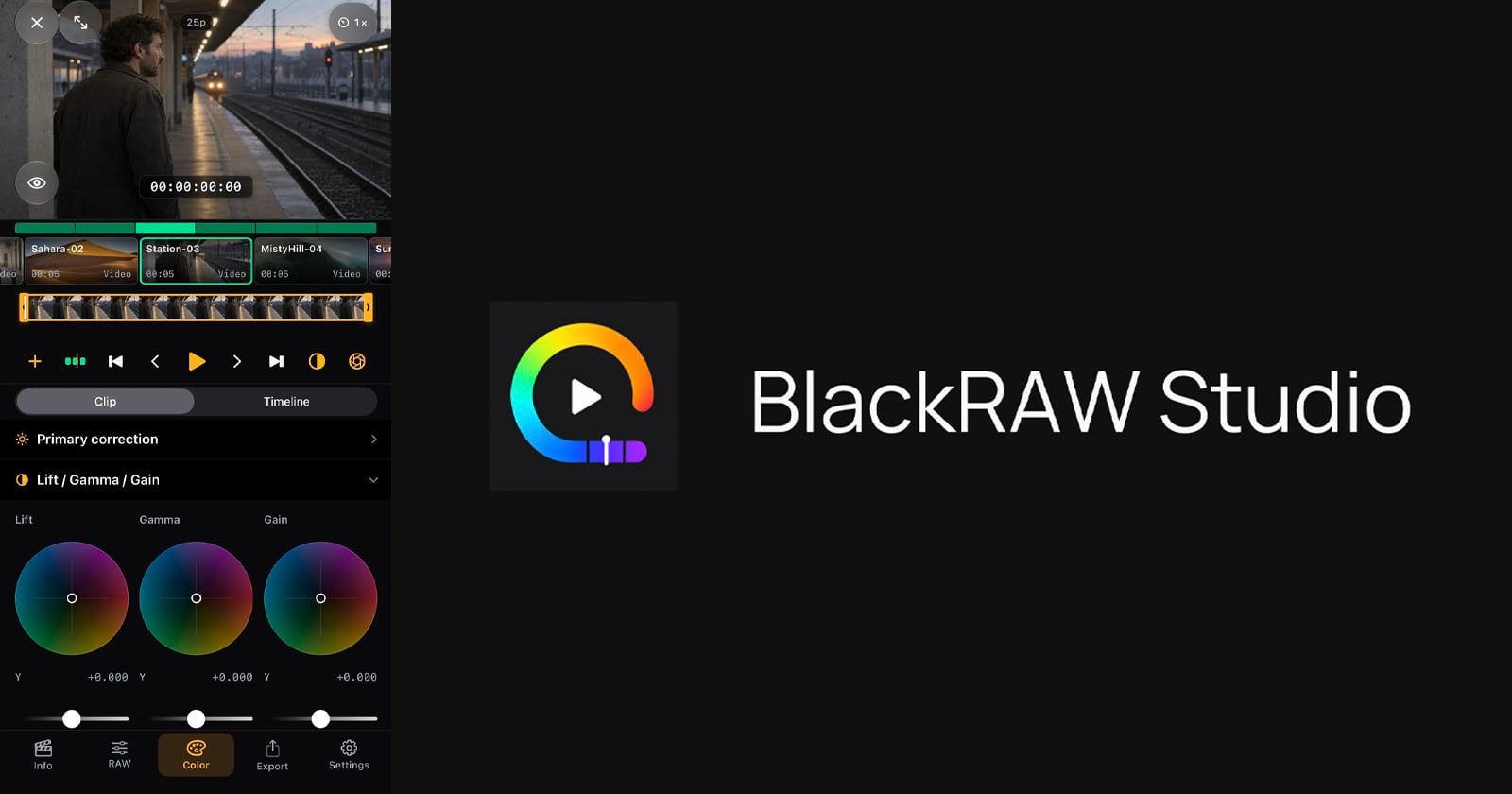
- Multi-clip Support: Editors can import and arrange multiple clips onto a timeline.
- Dedicated Trim View: Creators can precisely set shot in-points and out-points.
- Timeline Playback: Smooth scrubbing and playback of high-bitrate raw files, optimized for Apple’s powerful mobile silicon chips (A-series processors).
Advanced Color Grading Suite
Perhaps the most impressive aspect of BlackRAW Studio is its deep color toolset, which mimics workflows found in professional color-grading suites:
- Primary Adjustments: Exposure, contrast, saturation, and white balance controls.
- Color Wheels: Professional Lift, Gamma, Gain, and Offset wheels for precise tonal balance control.
- Curves: Y (Luma), Red, Green, and Blue custom curves for fine-tuning contrast and color casts.
- HSL Qualifiers: Hue, Saturation, and Luminance secondary color adjustments for targeted isolation.
- ColorSlice: Advanced color-density controls inspired by high-end desktop color grading suites.
- Look Management: Users can apply grades to individual clips or copy-paste grades across an entire timeline.
- LUT Integration: Support for importing external Look-Up Tables (.cube files) and exporting static color adjustments as custom .cube LUTs for use in other software.
Export and Trimming Options
When it is time to send work downstream to a post-production house or client, BlackRAW Studio offers multiple export pathways:
- Standard Renders: Export individual graded clips or a fully rendered timeline in H.264, HEVC, or ProRes 422 in Standard Dynamic Range (SDR) directly to the Files app or Photos library.
- Lossless BRAW Trimming: For Blackmagic camera workflows, supported BRAW originals can be trimmed and saved directly to the Files app without re-encoding or baking in the color grade. This preserves the raw sensor data for final finishing in software like DaVinci Resolve. (Note: Apple ProRes RAW supports source-appropriate raw adjustments, but original raw file trimming is currently exclusive to BRAW files).
Official Responses and Philosophy
The philosophy guiding BlackRAW Studio’s development is rooted in pragmatism. The company behind the app has been transparent about its intended use case, acknowledging that very few filmmakers actually want to lock a final cut, mix audio, and finish a multi-camera cinematic project on a 6.1-inch or 6.7-inch smartphone screen.
In an official statement detailing the app’s release, the company explained:
"BlackRAW Studio complements an existing production workflow: review footage, try a look and prepare selected material on iPhone, then continue in the production’s finishing tools."
This workflow-centric approach addresses a major bottleneck in modern video production. On busy commercial or indie sets, Directors of Photography and digital imaging technicians (DITs) are constantly pressured to deliver quick look-development proofs to clients or directors.
Traditionally, this required spinning up a laptop, importing raw cards, opening a heavy desktop application, and generating proxy files. By moving this preliminary stage to the iPhone, BlackRAW Studio allows a crew member to pull a clip from an SSD, dial in a compelling look using sophisticated lift/gamma/gain wheels or a custom LUT, and export a quick reference video or trimmed raw file in a matter of minutes—all while standing on set.
Implications for the Mobile Filmmaking Industry
The launch of BlackRAW Studio carries significant implications for the future of mobile content creation, professional workflows, and the broader software ecosystem on iOS.
1. The iPhone as a Legitimate Cinema Terminal
For years, Apple has pushed the iPhone as a serious tool for filmmakers, highlighting features like ProRes recording, Log profiles, and USB-C external drive recording. However, the software ecosystem has occasionally lagged behind hardware capabilities when handling raw cinema formats. By introducing desktop-class raw decoding and grading to iOS, BlackRAW Studio solidifies the iPhone’s status not just as a camera, but as an indispensable mobile digital imaging terminal.
2. Streamlining On-Set DIT and Editorial Pipelines
By allowing zero-loss trimming of BRAW files and rapid proxy generation via external USB-C drives, the app accelerates the handoff between shooting and editing. DPs can experiment with looks on location and communicate their creative vision instantly to editors, reducing miscommunications in post-production. Furthermore, the ability to export custom adjustments as .cube LUTs means that experimental looks created on a phone can be deployed immediately on a desktop grading suite.
3. Pricing and Accessibility
With a freemium model that offers a free download and review experience—backed by flexible subscription ($4.99/mo, $39.99/yr) or a lifetime buyout option ($69.99)—the app lowers the barrier to entry for independent creators. While hobbyists might balk at a pro subscription, professional videographers and commercial DITs will likely find the time-saving utility of mobile raw grading well worth the investment.
Looking Ahead
As mobile chipsets continue to rival desktop processors in thermal efficiency and raw computing power, apps like BlackRAW Studio are paving the way for a fully realized mobile post-production ecosystem. While desktop applications will always reign supreme for final-stage finishing, color grading, and visual effects work, the ability to handle heavy raw cinema codecs in the palm of your hand marks a permanent shift in how films are prepared, reviewed, and brought to life.